Meteorological data
Surface FootNet and Column FootNet require different meteorological inputs as shown in the figure below. These meteorological inputs are required at the time of measurement, 6 hours, 12 hours, 18 hours and 24 hours before the measurement was made. We append these meteorological inputs together in the above order and provide to the FootNet models.
Which meteorology product to use?
- For this work, we used High Resolution Rapid Refresh (HRRR) meteorology which is available at 3 km resolution.
- We regrid this meteorology to 1km resolution before using with FootNet.
- Note: The original HRRR data format does not support efficient data loading in Python. We converted the required met fields into NetCDF4 format for efficient data loading (See code).
- We recommend using a high spatial resolution (1 - 5km) meteorological product for best results.
- Recommended temporal resolution is 6 hours.
- What if available meteorological data is coarser than recommended?
- We have also evaluated FootNet on Global Forecast System (GFS) data and found it to be effective on the GFS dataset as well.
- It is also possible to use other data products such as WRF, ERA-5 etc.
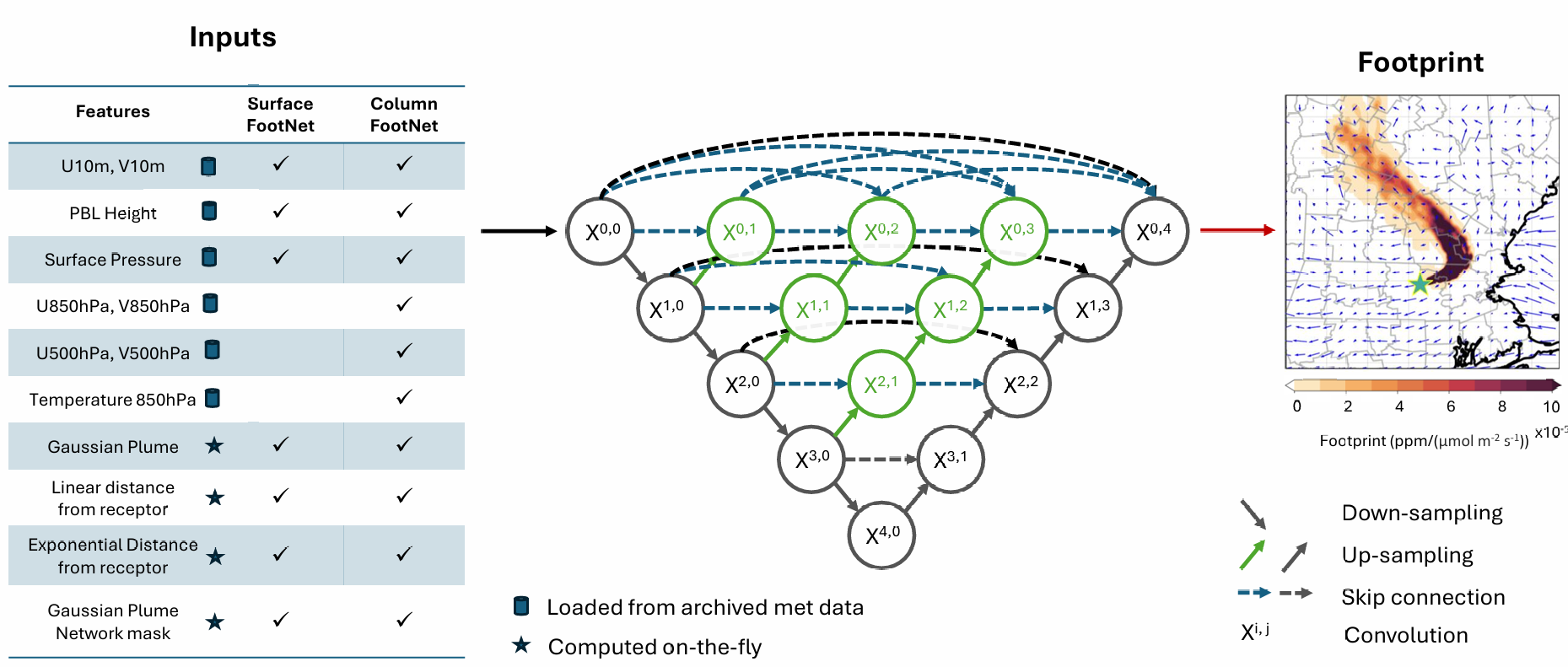
Input for Surface FootNet (in order)
- Gaussian Plume with U10 and V10 at time of measurement (input channel count: 1)
- U10, V10, PBL Height, Surface Pressure (input channel count: 20)
- Order: time of measurement, 6 hours, 12 hours, 18 hours and 24 hours before measurement
- Scaling factors (in order): [10, 10, 0.001, 0.001]
- Linear distance of pixels from receptor (input channel count: 1)
- Exponential distance of pixels from receptor (input channel count: 1)
- Binary spatial mask based on Gaussian plume network (input channel count: 1)
- Total input channels: 24
Meteorology for Surface FootNet from HRRR lite files — check out the complete code on GitHub
from getSurfaceMeteorology import SurfaceMeteorology

# Meteorology data & path
hr3lon_full = np.load('../data/HRRR_lon_lat.npz')['lon']
hr3lat_full = np.load('../data/HRRR_lon_lat.npz')['lat']
hr3lon_full = (hr3lon_full+180)%360-180  # convert from 0~360 to -180~180
HRRR_DIR = 'PATH'
trimsize = 150

# Defining spatial domain
lats = np.arange(30.384, 33.717, 1/120)
lons = np.arange(-96.323, -92.990, 1/120)

# Defining receptor
timestamp1 = datetime.datetime(2021, 10, 20, 16)
receptor_lon1 = -94.657
receptor_lat1 = 32.618

# Getting surface meteorology
timelist = [timestamp1]
input_met = SurfaceMeteorology(timelist, lons, lats, trimsize, hr3lat_full, hr3lon_full, HRRR_DIR, backhours=[0, 6, 12, 18, 24])
Input for Column FootNet (in order)
- Gaussian Plume with U10 and V10 at time of measurement (input channel count: 1)
- U10, V10, PBL Height, Surface Pressure, U850, V850, U500, V500, T850 (input channel count: 45)
- Order: time of measurement, 6 hours, 12 hours, 18 hours and 24 hours before measurement
- Scaling factors (in order): [10, 10, 0.001, 0.001, 1, 1, 1, 1, 0.01]
- Linear distance of pixels from receptor (input channel count: 1)
- Exponential distance of pixels from receptor (input channel count: 1)
- Binary spatial mask based on Gaussian plume network (input channel count: 1)
- Total input channels: 49
Meteorology for Column FootNet from HRRR lite files — check out the complete code on GitHub
from getColumnMeteorology import ColumnMeteorology

# Meteorology data & path
hr3lon_full = np.load('../data/HRRR_lon_lat.npz')['lon']
hr3lat_full = np.load('../data/HRRR_lon_lat.npz')['lat']
hr3lon_full = (hr3lon_full+180)%360-180  # convert from 0~360 to -180~180
HRRR_DIR = 'PATH'
trimsize = 150

# Defining spatial domain
lats = np.arange(43.002, 46.335, 1/120)
lons = np.arange(-87.390, -84.058, 1/120)

# Defining receptor
timestamp1 = datetime.datetime(2021, 7, 27, 6)
receptor_lon1 = -86.253
receptor_lat1 = 44.314

# Getting surface meteorology
timelist = [timestamp1]
input_met = ColumnMeteorology(timelist, lons, lats, trimsize, hr3lat_full, hr3lon_full, HRRR_DIR, backhours=[0, 6, 12, 18, 24])